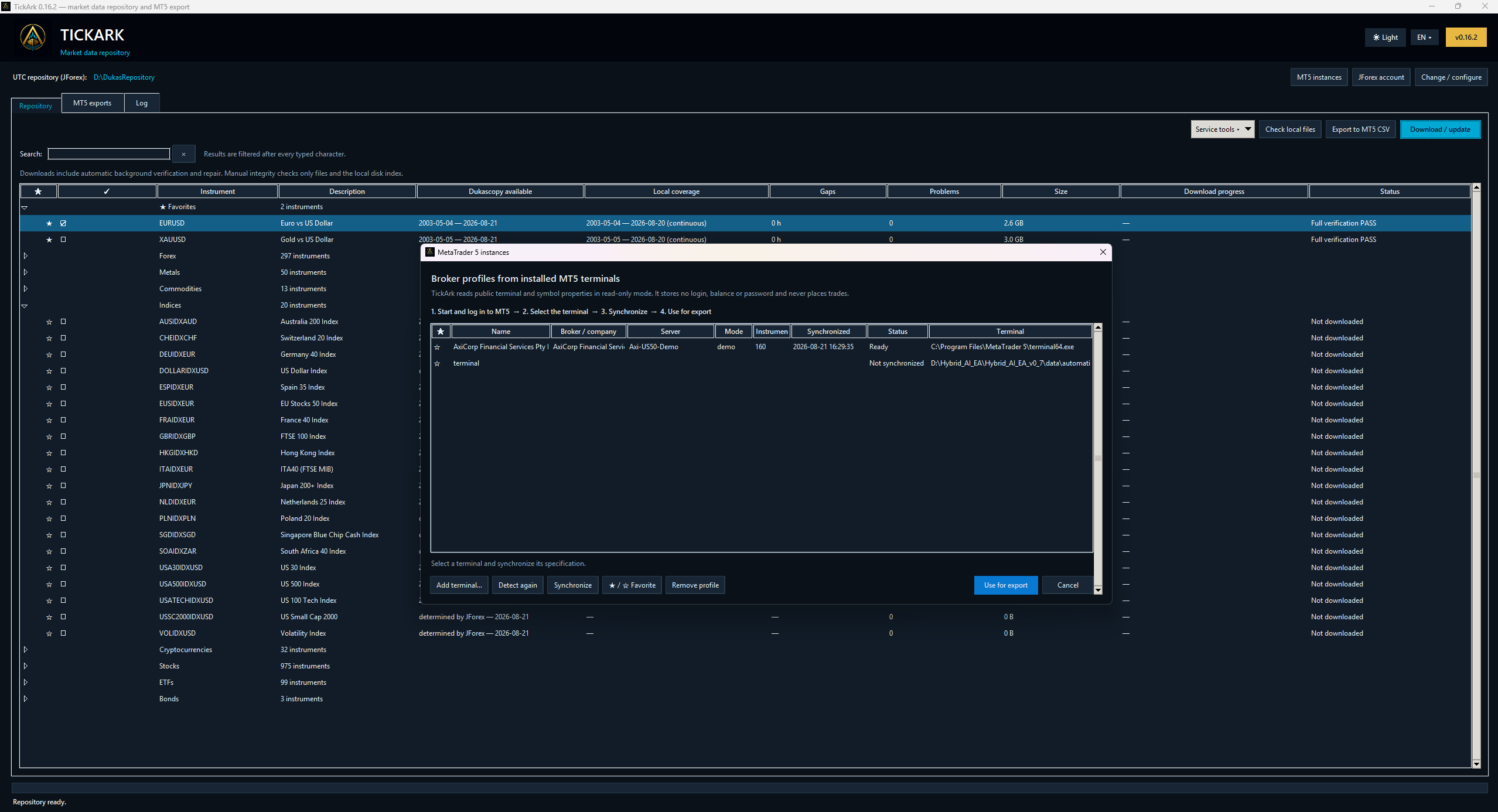
Detect the terminal
TickArk finds installed MetaTrader 5 terminals or lets you add a terminal path explicitly.
 PRIVATE BETA ↗
MetaTrader 5 · Supported
TickArk connects a verified UTC repository to MetaTrader 5 through synchronized terminal profiles, explicit symbol mapping and a ready-to-import package.
WHY BROKER CONTEXT MATTERS
A familiar market name does not guarantee identical symbol properties across MetaTrader 5 installations. Broker naming, server profiles and public instrument specifications can differ.
TickArk therefore makes the target environment an explicit part of export preparation. A synchronized MT5 profile is selected before the destination symbol and operation are confirmed.
The goal is not to place trades or access account information. TickArk reads public terminal and symbol properties for export preparation; it does not store a login, password or balance and it does not place trades.
EXPORT WORKFLOW
TickArk finds installed MetaTrader 5 terminals or lets you add a terminal path explicitly.
Public terminal and symbol properties are read in a non-trading, read-only workflow and stored as an export profile.
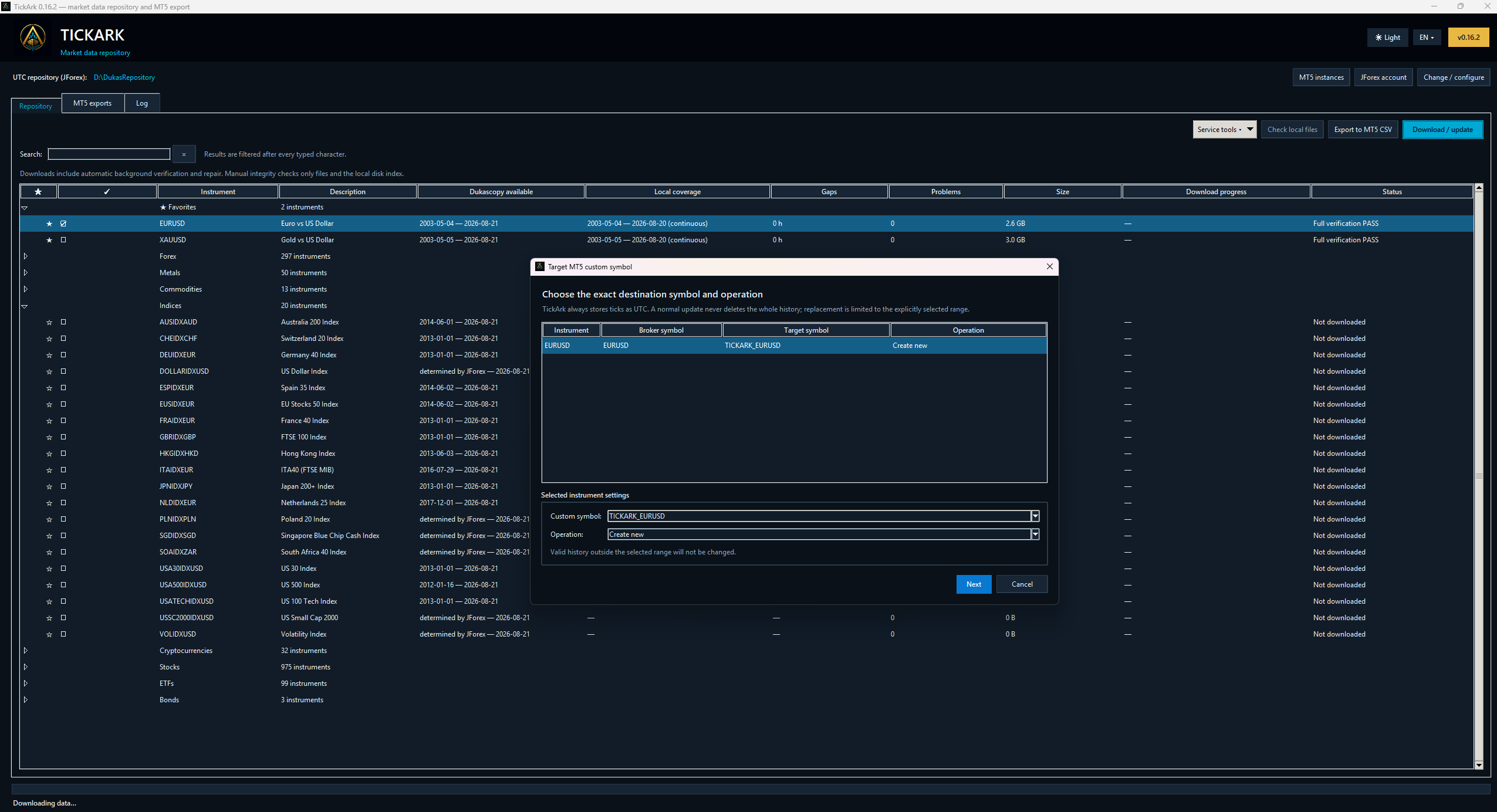
Choose the source instrument, broker symbol, custom target symbol and requested create or update operation.
TickArk prepares the CSV data, manifest and MQL5 importer required for the selected MT5 workflow.
TERMINAL PROFILES
Detected MT5 instances are listed with broker/company, server, mode, instrument count, synchronization time and local terminal path. A selected profile can then be used for export.
DESTINATION MAPPING
TickArk shows the source instrument, matched broker symbol, custom destination symbol and operation together. Valid history outside the selected replacement range is left unchanged.
CURRENT PRODUCT SCOPE
Export starts from the selected history in the TickArk repository, with coverage and problem state visible before preparation.
The target broker, server and public symbol specification stay attached to the export decision.
Use a dedicated destination name and choose the operation rather than relying on an implicit overwrite.
Receive the historical CSV data, a manifest and an MQL5 importer prepared for the selected profile.
TECHNICAL CONTEXT
MetaTrader 5 documents custom financial instruments and the ability to import tick history for testing and analysis. TickArk adds a repository, integrity and broker-profile workflow before that platform import stage.
Read the official MetaTrader 5 custom instruments documentation ↗External documentation is provided for technical context. TickArk is an independent product.QUESTIONS
No. The current profile workflow reads public terminal and symbol properties for export preparation. It does not place trades or store account login, password or balance information.
No. The destination and operation are selected explicitly. For a scoped replacement, valid history outside the selected range is left unchanged.
The current UI prepares CSV data, a manifest and an MQL5 importer for the selected MT5 profile and custom symbol workflow.
Not currently. MetaTrader 4 support remains a planned roadmap item with no announced release date.
PRIVATE BETA
Join the private beta interest list. Share the instruments and workflow that matter to you, and we'll contact you when a suitable opportunity becomes available.
Join the Private Beta ↗